


The Buffalo News App
4.5236.00 Reviews
App Specs
- Version
- 9.22
- Updated On
- License
- Free
- Downloads
- 50,000+
- Developer
- The Buffalo News
- Categories
- News & Magazines
- Platform
- Android
Screenshots




 Analysis by AppCompare
I see The Buffalo News App as a focused local-news choice rather than an all-purpose window on the world. Its appeal is clearest if Buffalo and Western New York are part of your everyday life: it brings local reporting, sports, and weather into one place, so you can check what is happening nearby without sorting through a national news feed first. I would recommend it to readers who value that regional focus, while anyone looking mainly for international headlines may be better served by a broader news app.
What the app is built to do
Published by The Buffalo News, this free news app has been available since August 28, 2012, and its current version is 9.19.3. It has a 4.5 average from around 447 ratings and more than 50,000 installs. Those figures suggest a well-established audience, though popularity alone does not tell you whether its coverage matches your interests. The more useful question is whether you want a regular, mobile connection to Buffalo-area news.
For me, the strongest reason to keep a regional news app handy is that local developments can be easy to miss in services designed to cover everywhere at once. A national aggregator may offer a wider range of headlines, but it can leave neighborhood issues, local decisions, and area sports competing for space with stories from far away. This app makes more sense when your news routine starts with the place where you live, work, study, or have family.
A practical role in a daily routine
A realistic use is a quick check before leaving home: I can look for a local headline, see whether there is a weather update worth factoring into the day, and then return later if a story deserves more attention. That is a more useful habit than opening a general feed and scrolling until something relevant happens to appear. If Buffalo-area news is part of your routine, the app can help make that check feel deliberate rather than incidental.
It can also be useful when you live outside the region but still have a personal reason to follow it. Someone with relatives in Western New York, for example, may want local context that national coverage rarely provides. The same applies to former residents who want to keep an eye on area sports or civic developments. In those cases, the app’s regional emphasis is not a limitation; it is the point.
I would not treat it as a replacement for every other news source. If I wanted a broad international briefing or a mix of perspectives from publishers across many countries, I would use a national or global news service alongside it. A local publication can offer valuable depth on its home region, but a specialized focus naturally leaves less room for subjects beyond that patch. The best fit is a complementary source, not necessarily the only one on your phone.
Local coverage is the main advantage
The app’s clearest strength is its commitment to Western New York. Rather than asking a reader to filter a huge stream of unrelated headlines, it gives local reporting and sports a more central role. That can be especially helpful during a busy week, when a short check-in is all the time you have. The value is less about being a complete library of news and more about making the region’s stories easier to notice.
Worth Reading Before You Choose

EA SPORTS FC Mobile 26 Is a Bigger Football Game, but It Takes Time

Flipboard Shows What News Apps Must Do Beyond the Feed

Switching to Android Auto Means Rethinking Your Driving Routine

Google Calendar Makes a Crowded Week Easier to Manage

Ludo King Makes the Most of the Minutes Between Plans

Baby Panda World Brings Quick Play to Modern Phones, but Its Game Library Feels Busy
Sports readers may appreciate that local coverage sits alongside general news instead of being an afterthought in a broad feed. Weather has a similar practical role: it belongs in a regional news routine because local conditions can affect travel and plans. I find that combination more coherent than jumping between unrelated apps just to get a basic sense of what is happening nearby.
There is a useful trade-off here. A regionally focused publication can provide a more relevant starting point for local stories, but readers should not assume that every topic will receive the same space or depth as the subjects most central to the publication. If you follow a niche interest, it is sensible to keep a specialist source in your routine too. I would use this app to stay grounded in local events, then look elsewhere when I need a wider or more technical view.
What to expect from the experience
In my experience, the app presents itself as a straightforward way to reach the publication’s coverage on a phone. That is the right priority for a news reader: getting to a relevant story should feel easier than navigating a complicated set of menus. A local app earns its place through regular usefulness, not by adding layers of features that distract from the reporting.
One practical tip is to decide what you want from a news check before opening it. If you are looking for a quick update on local developments, scan the regional coverage first; if you are checking sports or weather, go directly to that need rather than browsing without a purpose. This small habit makes a focused app more valuable, especially when your reading time is limited.
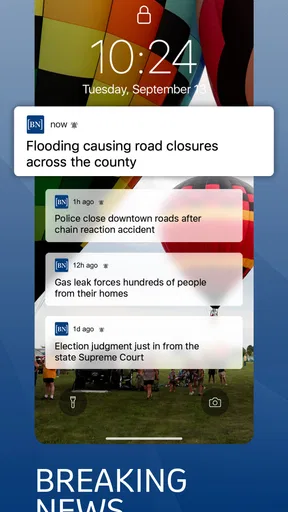
It is also worth thinking about how often you want news notifications on your phone. Alerts can be useful when a story is time-sensitive, but too many interruptions can make any news app feel noisy. I would keep notifications only if they help me respond to genuinely important local developments; otherwise, opening the app when it suits me is a calmer way to stay informed. The right choice depends on whether you want news to come to you or prefer to check in on your own schedule.
Where it may not be the right fit
The regional focus is also the main reason some readers may decide against it. If Buffalo has little connection to your life, the local emphasis may not give you enough relevant material to justify a place on your home screen. Likewise, anyone who expects a single app to cover local, national, and international events evenly should choose a broader service or combine this one with another source.
Cost is another point to consider before settling into a regular reading habit. The app is free to download, but it offers in-app purchases priced from $26.99 to $324.99 per item. Those options make it important to check what an offered purchase includes before committing. I would not assume that downloading the app means every article or service is automatically included; review the purchase details in the app and decide whether the access suits your reading needs and budget.
The app is rated Everyone 10+, and it requires Android 7.0 or later. That gives Android users a practical compatibility check to make before installing. The age rating is useful context for families, but it does not replace a parent’s judgment about whether a particular article or news topic is appropriate for a child. As with any news source, the content can reflect serious events and changing headlines.
Who I would recommend it to
I would put it on the shortlist for Buffalo-area residents who want a convenient way to follow local reporting, sports, and weather. It is also a sensible option for people who have moved away but still care about what is happening in Western New York. The app is most valuable when its home region overlaps with the reader’s daily decisions or personal interests; without that connection, its specialization has less to offer.
For someone who mainly wants a quick national briefing, I would start with a general news aggregator instead. Those services are often better suited to comparing headlines from multiple publishers or scanning events across a wider geography. For local context, though, a regional publication has a clearer purpose. I would use each type for what it does best rather than expecting one to replace the other.
If you are unsure whether the app belongs in your routine, try defining a simple test for yourself: do you have a local question you want answered most days? That might be what is happening in area news, what local teams are doing, or whether weather could affect a plan. If you regularly look for those updates, a dedicated regional app has a practical role. If you rarely do, a broader source may be a better match.
My overall impression
There is no need to install a local news app just because it exists; it should earn its place by making relevant information easier to reach. The Buffalo News has a clear reason to be considered when Western New York matters to you, and its focus gives it a distinct role beside broad news services. I would judge it by the usefulness of that local connection, not by whether it covers every subject a reader could possibly follow.
For me, the best approach is to use it as a regional anchor: check it for Buffalo-area stories, then turn to other sources when I need international coverage, specialist reporting, or a range of publishers. That division of labor keeps expectations realistic and makes the local focus feel purposeful rather than incomplete.
Have you ever found yourself yearning for a reliable and comprehensive news source right at your fingertips? Well, let me introduce you to the Buffalo News App. I've spent some time exploring it, and I've got some thoughts to share with you.
First Impressions
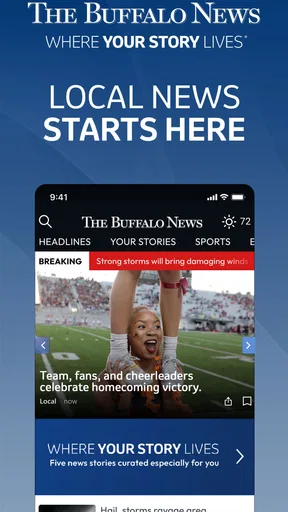
From the moment I downloaded the Buffalo News App, I was struck by its clean and intuitive interface. It’s designed to get you straight to the information you need without any unnecessary fluff. Navigation is a breeze, with everything you could possibly want just a few taps away. The app feels like it’s been crafted with the user in mind, and I appreciate that.
Features That Stand Out
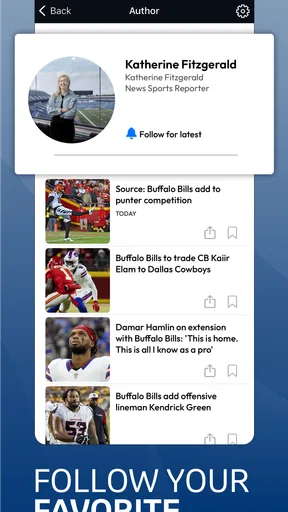
One of the first things that caught my attention was the personalized news feed. It’s like having your own custom newspaper, tailored to what you’re interested in. Whether you're into local politics, sports, or the arts, the Buffalo News App has got you covered. You can easily customize your feed and even get notifications on breaking news that matters to you.
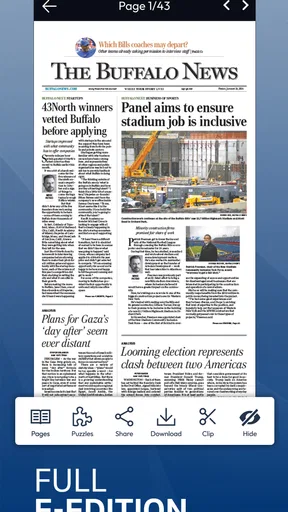
Another feature worth mentioning is the offline reading mode. We all know that staying connected isn’t always possible, especially when you’re on the go. With this app, you can download articles and read them later, even without an internet connection. It’s a small detail, but it makes a huge difference for those of us who are constantly on the move.
Content Quality
The quality of the content is where this app truly shines. You can tell that the articles are written by seasoned journalists who know their stuff. The reporting is thorough, well-researched, and offers multiple perspectives on the issues at hand. It's refreshing to see such dedication to journalistic integrity in a digital format.
The multimedia aspect is also noteworthy. The app includes videos, photo galleries, and even podcasts, which add depth and context to the written articles. It’s like having a multimedia news center in your pocket.
User Experience
Let’s talk about user experience for a moment. One thing I’ve noticed is how smoothly the app runs. I’ve used other news apps before that felt clunky and slow, but that’s not the case here. Pages load quickly, and there’s minimal lag when switching between sections. It’s clear that the developers have put a lot of effort into optimizing performance.
The app’s design is also very pleasing to the eye. It uses a simple color scheme that’s easy on the eyes, making it comfortable to read for extended periods. Plus, the font size and style can be adjusted, catering to users with different preferences and visual needs.
A Few Considerations
Of course, no app is perfect, and while I’ve had a great experience overall, there are a couple of things to keep in mind. The app does have ads, which can be a bit distracting at times. However, they are not overly intrusive, and I suppose it's a small price to pay for accessing quality journalism.
Additionally, while the app offers a rich variety of local and national news, it might not be ideal for those looking for international coverage. But then again, it’s the Buffalo News, so the focus on local news is expected.
The Final Takeaway
All in all, the Buffalo News App is a fantastic resource for anyone in and around Buffalo looking to stay informed. It combines high-quality journalism with a user-friendly design, making it a pleasure to use. Whether you're a news junkie or just want to stay up-to-date with local happenings, this app has something for everyone.
If you're looking for a reliable news source on your mobile device, I'd definitely recommend giving this app a try. After all, staying informed has never been easier or more convenient.
Pros
- User-friendly interface for easy navigation.
- Real-time updates keep you informed instantly.
- Customizable notifications for breaking news.
- Offline reading mode for convenience.
- Comprehensive local and national coverage.
Cons
- Ads can be intrusive during reading.
- Occasional app crashes reported by users.
- Limited personalization of news categories.
- Subscription required for full access.
- Some articles lack multimedia content.
FAQs for The Buffalo News App
What features does The Buffalo News App offer?
The Buffalo News App provides users with access to the latest news, sports updates, entertainment, and local events. It offers personalized notifications, breaking news alerts, and the ability to save articles for offline reading. Users can also access multimedia content, including videos and photo galleries, making it a comprehensive news source for residents and fans of Buffalo.
Is The Buffalo News App free to use?
The app is free to download and offers a selection of articles without charge. However, to gain full access to all content and features, users may need to subscribe to a digital or print subscription. Subscription details, including pricing and benefits, are available within the app and on the official website.
Can I customize notifications in The Buffalo News App?
Yes, the app allows users to customize notifications based on their interests. You can choose to receive alerts for breaking news, sports updates, weather conditions, and specific topics. This feature ensures that you only receive notifications that are relevant to your preferences, enhancing your news consumption experience.
Does The Buffalo News App require an internet connection?
While an internet connection is required to access the latest news and updates, the app allows you to save articles for offline reading. This feature is particularly useful for users who wish to read content without using data or while in areas with limited connectivity.
How user-friendly is The Buffalo News App?
The app is designed with user experience in mind, offering a clean and intuitive interface. Navigation is straightforward, allowing users to easily browse through different sections, access saved articles, and adjust settings. The app's design makes it accessible for all types of users, from tech-savvy individuals to those less familiar with digital platforms.


